
How to draw the illustrations?

Step 1: Draw the black linesStart in Adobe Illustrator. Shapes are as geometric a possible. For the open ended strokes we use a specific stroke profile and rounded end caps. You can find the stroke profile in the Illustrator file attached.

Step 2: Draw a rough shape for the organic shapeIt needs to be a single shape so use pathfinder "Unite"
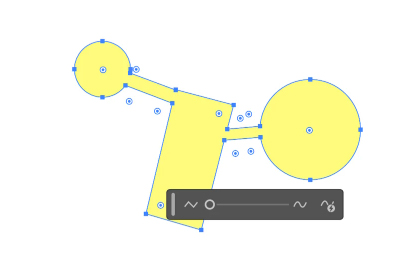
Step 3: Use Smooth tool to create the organic shapeObject > Path > Smooth and move the cursor

Step 4: The shape is defineAt this point you can take it to Figma if you prefer.

Step 5: Draw a shape for the grainYou can find the brush profile for the grain in the Illustrator and Figma files attached.

Step 6: Mask the grain in the organic shapeTada!
Lorem ipsum dolor sit amet consectetur. Elementum lorem lectus.